
An alternative to WhatsApp for family caregiving
Updated 16 July 2026
A WhatsApp group is where most families start. Something changes — a hospital stay, a new diagnosis, a parent who needs more support — and within a week there’s a group called “Mum” with five people in it.
It’s also where the problems show up. Too many messages. No one sure who’s done what. The last definite mention of the medications was yesterday lunchtime. And one person — usually the same person — quietly carrying the load.
Why the group chat breaks down
It’s almost always 11pm when the text arrives: “Did anyone make sure Mum took her tablets?” Six people in the chat. No one’s claimed it. You’re tired, you weren’t even there today, but you’ll be the one who replies “I’ll call her now.”
The problem isn’t that the others don’t care. It’s that a chat thread has no state. A message about a prescription scrolls away as fast as a photo of the grandkids. There’s no answer to “what’s been done?” — only an archaeology dig through the scroll.
That’s the thing to hold onto when you’re looking for an alternative: the group didn’t fail because people stopped caring. It failed because a chat is built for conversation, and coordinating care needs a current answer — what’s prescribed now, who’s going Tuesday, what’s still not done.
What to look for in an alternative
Before comparing tools, it helps to name what the replacement actually has to do. Families who make the switch well tend to want the same five things:
- It holds the current state. One place that answers “what’s true right now” — not a thread you have to scroll back through.
- Everyone sees the same version. When something changes, it changes once, for everyone — no relaying.
- There’s room for people who only read. Most families have someone who wants to stay informed without managing anything. The alternative should let them.
- The family controls who sees what. Care information is private. You should be able to decide who’s in, what they can see, and change it later.
- Nothing new to learn. If it takes a training session, the least-technical family member quietly drops out — and you’re back to relaying.
Three ways families replace the scroll
There isn’t one right answer. These are the three approaches we see families try, with an honest word on where each one holds and where it strains.
1. A stricter WhatsApp. Keep the group, add structure: a pinned message holding the medication list, or a second group that’s only for care updates, no chat. It’s free and there’s nothing to install. It works for a while — but the pinned message still has to be re-edited by hand every time something changes, and there’s no way to see who’s actually read the current version. Under pressure, the chat and the care updates blur back into one thread.
2. A shared document or spreadsheet. A Google Doc or Sheet with the medications, appointments, and jobs, shared with the family. This is a genuine step up: it holds state, everyone sees the same version, and it costs nothing. Its limits show up over weeks rather than days — it depends entirely on one person keeping it current, there’s nothing to tell the others that something changed, and on a phone at a pharmacy counter it’s slow to find the line you need. If your family is disciplined and small, it can be enough. We’ve written a fuller version of this approach in how to share a parent’s medication schedule with siblings.
3. A dedicated care-coordination app. Purpose-built tools — Kinclara is one — structure the information the way a caring family actually uses it: medications, appointments, and tasks as things with a current state, not lines in a document. The trade-off is real: it’s another app, and the family has to agree to move. The question to ask of any app on this list is the five points above — and, because this is care information, where the data goes. With Kinclara, the family decides who sees what, and the data stays inside the family — no advertising, no third-party sale, designed around GDPR-aligned privacy principles. It’s a free private beta, and core features will always be free to use.
What one shared view looks like
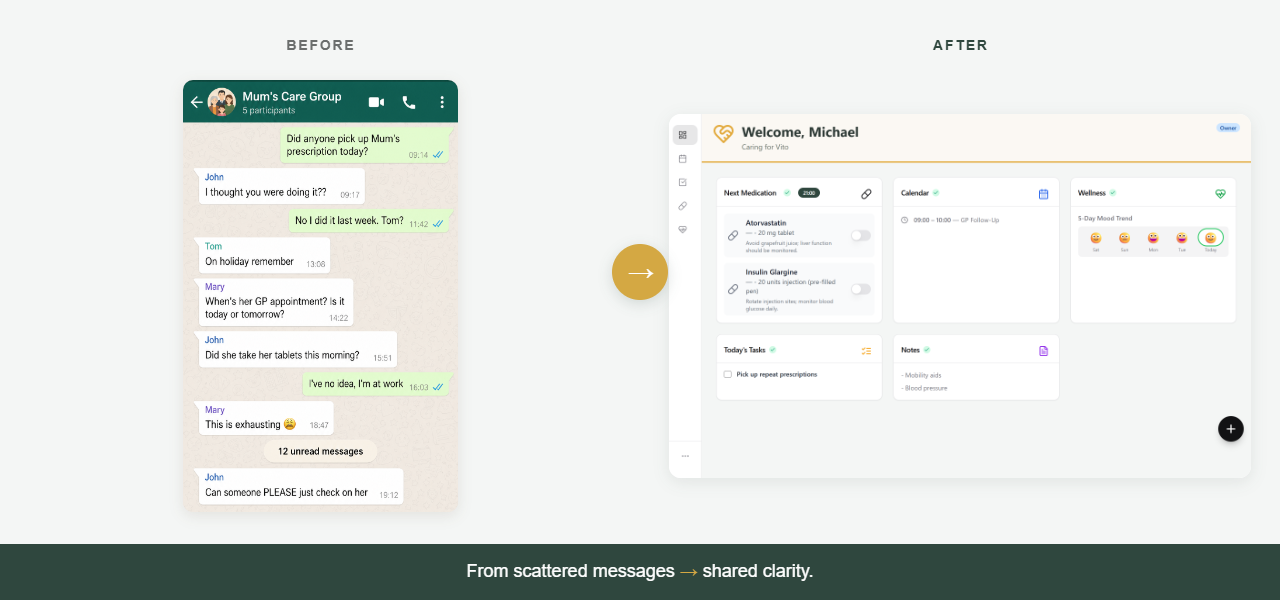
Kinclara replaces the scroll with one shared view: medications, appointments, and the next step, visible to everyone in the family. When something is done, everyone can see it was done. No one is left chasing.
You don’t need to convince your siblings to learn anything new. Every family member has a role — and view-only access lets the brother who just wants to read updates do exactly that, without having to manage anything.
It’s not a clinical tool. It’s for the family around the person — the small daily things that fall through when no one has a shared view.
What changes in the first week
The line we hear most from beta families isn’t “this is amazing.” It’s “I haven’t had to chase anyone since Tuesday.” The group chat goes quiet in the best way: it goes back to being for the photos.
Questions families ask
Is Kinclara free?
Yes. Kinclara is in free private beta, and core features will always be free to use. There's no card, no trial clock, and no paywall waiting at the end.
Do we have to stop using WhatsApp?
No. Most beta families keep the group chat — it just goes back to being for the photos and the chat. The medications, appointments, and tasks move to one shared view, so nothing important scrolls away.
What about the sibling who won't use another app?
They don't have to manage anything. View-only access lets them read updates without being asked to do things — and the family can keep relaying to anyone who prefers a phone call. One person opting out doesn't sink the shared view.
Whichever route your family takes — a pinned message, a shared doc, or a dedicated app — the goal is the same: one version of the truth, and no one left carrying it alone.